Démarrage
C’est quoi Docker ?
Docker est un logiciel qui exploite une fonctionnalité du noyau Linux appelé LXC.
LXC permet la virtualisation du Kernel Linux et Docker permet de faciliter son utilisation.
Dans son utilisation l’utilisateur ainsi que le conteneur ont la perception d’un environnement isolé et indépendant.
Initialement idéal pour le développement et les tests mais il est désormais prêt pour la production.
Un peu d’histoire
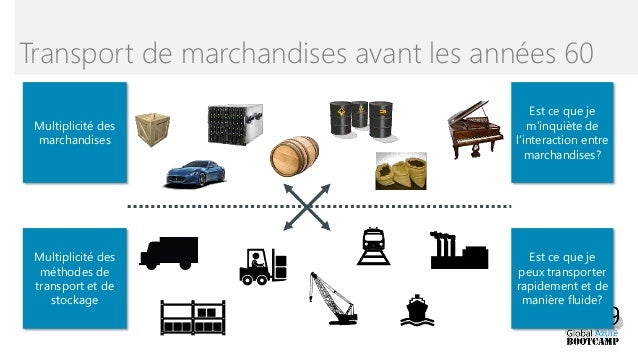
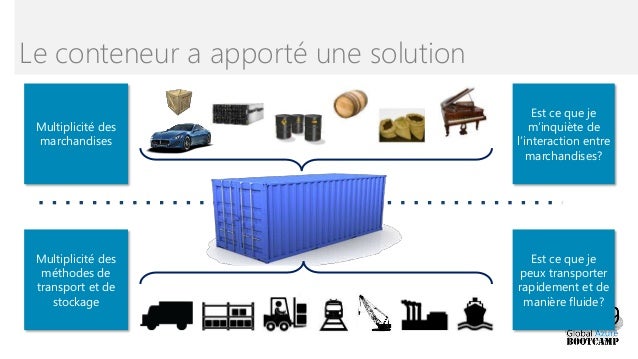
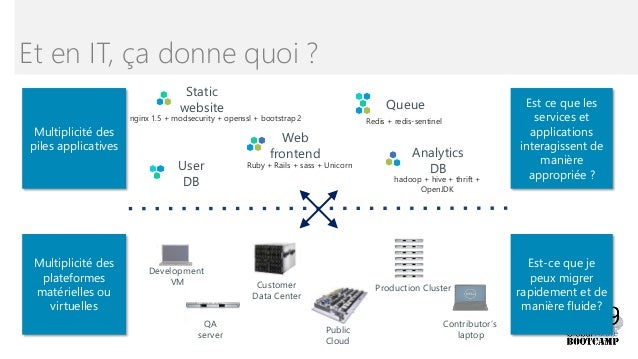
Dans le mode informatique
Machines virtuelles versus conteneur

Quels usages pour les conteneurs
- Isolation
- Déploiement rapide
- Micro services
- Portabilité
- Cloud
- DevOps
Architecture de Docker
 Docker est absé sur une architecture client-serveur :
- Docker Engine : Le Docker serveur au centre de l’architecture
- Client : Interface CLLI pour interagir avec le serveur
- Image : Image de binaires et de libraires pour exécuter des applications
- Conteneur : Une instance d’une image en exécution
- Registry : bibliothèques d’images
Docker Engine

Docker Engine est le daemon serveur au centre de l’architecture qui permet d’exécuter les conteneurs. Docker Engine utilise les namespaces Linux Kernel et les groupes de contrôle. L’isolation des conteneurs est garantie par les namespaces.
Namespace
Les namespaces isole une hierachie de processus, dans un namespace seuls certains processus sont visbles.

Cgroups
Les Cgroups permettent de contrôler l’accès aux ressources CPU et RAM à un ensemble de processus.
Docker Client
Le client Docker se connecte au Docker Engine. Le client peut-être installé sur la même machine que le daemon ou sur une machine différente. Deux types de client Docker :
- CLI
- GUI
Images
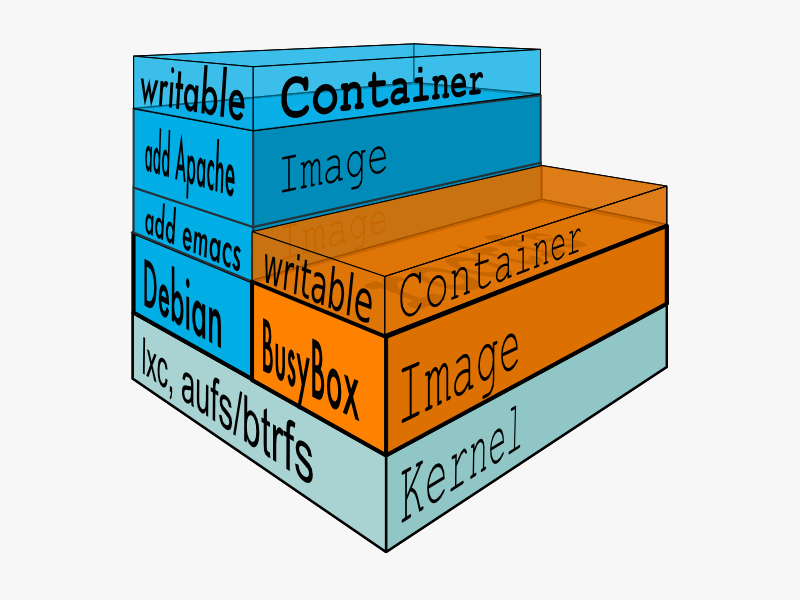
Les images docker sont des modèles en lecture seule utilisés pour créer des conteneurs. Ils peuvent être construites par vous ou d’autres utilisateurs Docker. Elles sont stockées dans le Docker Hub, ou votre propre registre.
Chaque image commence par une image de base (ex: Ubuntu) ou plus “avancée” comme NodeJS installé sur Ubuntu.
Chaque image est ensuite constituée d’une série de couches baptisées “layers” comme un mille feuille

Conteneur
Un conteneur est un espace d’exécution d’application isolé. Il contient tout ce qui est nécessaire pour exécuter votre applciation. Un conteneur peut être basé sur une ou plusieurs images.
Une image est une collection de fichiers et de méta-données
Les images sont composées de plusieurs couches
Une couche est également une image que vous souhaitez exécuter
Chaque image contient le logiciel que vous
Chaque image contient une couche de base
Docker utilise un mécanisme Copy On Write

Docker crée une couche supérieure en écriture pour les conteneurs
Les images parentes sont en lecture seule
Toutes les modifications sont apportées à la couche en écriture
Lors de la modification d’un fichier à partir d’une couche en lecture,
le mécanisme COW copie le fichier sur la couche en écriture, ce qui permet de modifier le fichier
Dockerfile
Un Dockerfile est un manifest qui décrit l’ensemble des commandes pour construire une image.
Processus de création
1. Créez un Dockerfile dans un nouveau dossier 2. Écrivez les instructions pour la construction de l’image 3. Quelle est l’image de base à utiliser 4. Quels sont les programmes à installer 5. Quelle commande à exécuter 6. Exécuter la commande docker build pour construire une image à partir du Dockerfile
Instruction Dockerfile
FROM spécifie l’image de base utilisée
- Doit être la première instruction spécifiée dans le Dockerfile
- Peut être spécifiée plusieurs fois pour créer plusieurs images
- Chaque FROM marque le début d’une nouvelle image
RUN spécifie une commande à exécuter
- Les modifications sont effectuées sur le système de fichiers
- Utilisée pour installer des bibliothèques, des packages
- N’enregistre pas l’état des processus
- Ne démarre pas les daemons automatiquement
exemple de Dockerfile :
FROM nginx
COPY static-html-directory /usr/share/nginx/html
Docker Hub
Le docker hub est un dépôt communautaire d’images Docker, on peut retrouver des images Docker officiel proposer par des éditeurs de solution open source comme Nginx, Apache, Tomcat, etc…

Points forts de Docker
- Cycle de développement rapide
- Portabilité et Evolutivité
- Plusieurs application sur une machine
- Facilité de charger et de démarrer un conteneur, puis d’y lancer un processus
- Automatisation du chargement et du lancement d’un conteneur
- Mise à jour et diffusion facile et rapide
Docker help
docker --help

Usage:  docker [OPTIONS] COMMAND

A self-sufficient runtime for containers

Options:
      --config string      Location of client config files (default "/root/.docker")
  -c, --context string     Name of the context to use to connect to the daemon (overrides DOCKER_HOST env var and default context set with "docker context use")
  -D, --debug              Enable debug mode
  -H, --host list          Daemon socket(s) to connect to
  -l, --log-level string   Set the logging level ("debug"|"info"|"warn"|"error"|"fatal") (default "info")
      --tls                Use TLS; implied by --tlsverify
      --tlscacert string   Trust certs signed only by this CA (default "/root/.docker/ca.pem")
      --tlscert string     Path to TLS certificate file (default "/root/.docker/cert.pem")
      --tlskey string      Path to TLS key file (default "/root/.docker/key.pem")
      --tlsverify          Use TLS and verify the remote
  -v, --version            Print version information and quit

Management Commands:
  builder     Manage builds
  config      Manage Docker configs
  container   Manage containers
  context     Manage contexts
  engine      Manage the docker engine
  image       Manage images
  network     Manage networks
  node        Manage Swarm nodes
  plugin      Manage plugins
  secret      Manage Docker secrets
  service     Manage services
  stack       Manage Docker stacks
  swarm       Manage Swarm
  system      Manage Docker
  trust       Manage trust on Docker images
  volume      Manage volumes

Commands:
  attach      Attach local standard input, output, and error streams to a running container
  build       Build an image from a Dockerfile
  commit      Create a new image from a container's changes
  cp          Copy files/folders between a container and the local filesystem
  create      Create a new container
  diff        Inspect changes to files or directories on a container's filesystem
  events      Get real time events from the server
  exec        Run a command in a running container
  export      Export a container's filesystem as a tar archive
  history     Show the history of an image
  images      List images
  import      Import the contents from a tarball to create a filesystem image
  info        Display system-wide information
  inspect     Return low-level information on Docker objects
  kill        Kill one or more running containers
  load        Load an image from a tar archive or STDIN
  login       Log in to a Docker registry
  logout      Log out from a Docker registry
  logs        Fetch the logs of a container
  pause       Pause all processes within one or more containers
  port        List port mappings or a specific mapping for the container
  ps          List containers
  pull        Pull an image or a repository from a registry
  push        Push an image or a repository to a registry
  rename      Rename a container
  restart     Restart one or more containers
  rm          Remove one or more containers
  rmi         Remove one or more images
  run         Run a command in a new container
  save        Save one or more images to a tar archive (streamed to STDOUT by default)
  search      Search the Docker Hub for images
  start       Start one or more stopped containers
  stats       Display a live stream of container(s) resource usage statistics
  stop        Stop one or more running containers
  tag         Create a tag TARGET_IMAGE that refers to SOURCE_IMAGE
  top         Display the running processes of a container
  unpause     Unpause all processes within one or more containers
  update      Update configuration of one or more containers
  version     Show the Docker version information
  wait        Block until one or more containers stop, then print their exit codes
Commandes Conteneur
Démarrage (Instanciation) d’un coneneur
docker run <nom_image>:<tag> bash
ou avec une commande shelldocker run <nom_image>:<tag> <commande_shell>
ou avec une suppression automatiquedocker run -rm <nom_image>:<tag> <commande_shell>
exemples:
Exécute l’image centos en détacher
docker run -d centos bash
Unable to find image 'centos:latest' locally
latest: Pulling from library/centos
8a29a15cefae: Pull complete
Digest: sha256:05c09d2d9769643a5b6a777ec7cb3f5343f3d5ebb83d0c3eff0fbeca7e693bd4
Status: Downloaded newer image for centos:latest
29998d08e64d3e702ce8e389610d3cbeb59805b14b3a8402b46f5d91f29c5879
Exécute l’image centos en détacher avec l’exécution de la commande pingdocker run -d centos ping 127.0.0.1 -c 60
Exécute l’image centos en détacher et l’ouverture de ports que l’image nginx à besoin
docker run -d -P nginx
Unable to find image 'nginx:latest' locally
latest: Pulling from library/nginx
8ec398bc0356: Pull complete
dfb2a46f8c2c: Pull complete
b65031b6a2a5: Pull complete
Digest: sha256:8aa7f6a9585d908a63e5e418dc5d14ae7467d2e36e1ab4f0d8f9d059a3d071ce
Status: Downloaded newer image for nginx:latest
2b1adfa3bcf86e60d55d8d3ff426d514fa29a31a5367e5452eba455cd15f4b30
Lister les conteneurs en exécution
docker ps
2b1adfa3bcf8        nginx                     "nginx -g 'daemon of…"   About a minute ago   Up About a minute   0.0.0.0:32768->80/tcp                            wizardly_easley
Lister tous les conteneurs arrêter/démarrer/pause
docker ps -a
CONTAINER ID        IMAGE                     COMMAND                  CREATED              STATUS                     PORTS                                            NAMES
2ea6e24e2112        filebeat-debian:7.3.2     "filebeat -c filebea…"   About a minute ago   Up 18 seconds                                                               filebeat
c3fd82d406f9        auditbeat-debian:7.3.2    "auditbeat -c auditb…"   About a minute ago   Up 13 seconds                                                               auditbeat
4d378cd1b324        packetbeat-debian:7.3.2   "packetbeat -c packe…"   About a minute ago   Up 13 seconds                                                               packetbeat
f7b1fe4fb721        heartbeat-debian:7.3.2    "heartbeat -c heartb…"   About a minute ago   Up About a minute                                                           heartbeat
4029e7c150a9        metricbeat-debian:7.3.2   "metricbeat -c metri…"   About a minute ago   Up 13 seconds                                                               metricbeat
6172dffeb152        elastic-debian:7.3.2      "./bin/elasticsearch"    About a minute ago   Up About a minute          0.0.0.0:9200->9200/tcp, 0.0.0.0:9300->9300/tcp   elastic
fc092aafbdfb        kibana-debian:7.3.2       "./../../usr/share/k…"   About a minute ago   Up About a minute          0.0.0.0:5601->5601/tcp                           kibana
2b1adfa3bcf8        nginx                     "nginx -g 'daemon of…"   About a minute ago   Up About a minute          0.0.0.0:32768->80/tcp                            wizardly_easley
29998d08e64d        centos                    "bash"                   6 minutes ago        Exited (0) 6 minutes ago                                                    compassionate_matsumoto
7d476831a6c9        9b699e9e1a17              "/bin/sh -c 'apt-get…"   17 hours ago         Exited (1) 17 hours ago                                                     clever_meitner
S’attacher sur un conteneur en cours d’exécution (-it) en mode avant-plan
docker attach <conteneur_ID>
Utiliser CTRL+P+Q pour se détacher sans arrêter le conteneur
exemple :
docker attach 2b1adfa3bcf8
10.106.86.166 - - [17/Jan/2020:10:14:28 +0000] "GET / HTTP/1.1" 200 612 "-" "Mozilla/5.0 (Windows NT 10.0; Win64; x64) AppleWebKit/537.36 (KHTML, like Gecko) Chrome/79.0.3945.117 Safari/537.36" "-"
Afficher la sortie standard du conteneur en cours d’exécution
docker logs <conteneur_ID>
ou en temps réeldocker logs -f <conteneur_ID>
exemples:
docker logs 284b6025af1d
10.106.86.166 - - [17/Jan/2020:10:16:50 +0000] "GET / HTTP/1.1" 200 612 "-" "Mozilla/5.0 (Windows NT 10.0; Win64; x64) AppleWebKit/537.36 (KHTML, like Gecko) Chrome/79.0.3945.117 Safari/537.36" "-"
2020/01/17 10:16:50 [error] 6#6: *1 open() "/usr/share/nginx/html/favicon.ico" failed (2: No such file or directory), client: 10.106.86.166, server: localhost, request: "GET /favicon.ico HTTP/1.1", host: "10.106.87.137:32769", referrer: "http://10.106.87.137:32769/"
10.106.86.166 - - [17/Jan/2020:10:16:50 +0000] "GET /favicon.ico HTTP/1.1" 404 555 "http://10.106.87.137:32769/" "Mozilla/5.0 (Windows NT 10.0; Win64; x64) AppleWebKit/537.36 (KHTML, like Gecko) Chrome/79.0.3945.117 Safari/537.36" "-"
10.106.86.166 - - [17/Jan/2020:10:16:52 +0000] "GET / HTTP/1.1" 304 0 "-" "Mozilla/5.0 (Windows NT 10.0; Win64; x64) AppleWebKit/537.36 (KHTML, like Gecko) Chrome/79.0.3945.117 Safari/537.36" "-"
10.106.86.166 - - [17/Jan/2020:10:16:52 +0000] "GET / HTTP/1.1" 304 0 "-" "Mozilla/5.0 (Windows NT 10.0; Win64; x64) AppleWebKit/537.36 (KHTML, like Gecko) Chrome/79.0.3945.117 Safari/537.36" "-"
10.106.86.166 - - [17/Jan/2020:10:16:52 +0000] "GET / HTTP/1.1" 304 0 "-" "Mozilla/5.0 (Windows NT 10.0; Win64; x64) AppleWebKit/537.36 (KHTML, like Gecko) Chrome/79.0.3945.117 Safari/537.36" "-"
10.106.86.166 - - [17/Jan/2020:10:16:52 +0000] "GET / HTTP/1.1" 304 0 "-" "Mozilla/5.0 (Windows NT 10.0; Win64; x64) AppleWebKit/537.36 (KHTML, like Gecko) Chrome/79.0.3945.117 Safari/537.36" "-"
10.106.86.166 - - [17/Jan/2020:10:16:52 +0000] "GET / HTTP/1.1" 304 0 "-" "Mozilla/5.0 (Windows NT 10.0; Win64; x64) AppleWebKit/537.36 (KHTML, like Gecko) Chrome/79.0.3945.117 Safari/537.36" "-"
10.106.86.166 - - [17/Jan/2020:10:16:53 +0000] "GET / HTTP/1.1" 304 0 "-" "Mozilla/5.0 (Windows NT 10.0; Win64; x64) AppleWebKit/537.36 (KHTML, like Gecko) Chrome/79.0.3945.117 Safari/537.36" "-"
Arrêt du conteneur
docker stop <conteneur_ID>
exemples:
docker stop 284b6025af1d
284b6025af1d
Supprimer un conteneur
docker rm <conteneur_ID>
exemples:
docker rm 284b6025af1d
284b6025af1d
Démarrage du conteneur
docker start <conteneur_ID>
exemples:
docker start 284b6025af1d
284b6025af1d
Afficher les propriétes du conteneur
docker inspect <conteneur_ID>
exemples:
docker inspect 50db6940b77a
[
    {
        "Id": "50db6940b77a0acc30feca37f781a2bf1d2e1d217766f4c16c744862a4f7c1d3",
        "Created": "2020-01-17T10:46:09.516872398Z",
        "Path": "nginx",
        "Args": [
            "-g",
            "daemon off;"
        ],
        "State": {
            "Status": "running",
            "Running": true,
            "Paused": false,
            "Restarting": false,
            "OOMKilled": false,
            "Dead": false,
            "Pid": 28668,
            "ExitCode": 0,
            "Error": "",
            "StartedAt": "2020-01-17T10:46:30.656955124Z",
            "FinishedAt": "2020-01-17T10:46:15.513767472Z"
        },
        "Image": "sha256:c7460dfcab502275e9c842588df406444069c00a48d9a995619c243079a4c2f7",
        "ResolvConfPath": "/var/lib/docker/containers/50db6940b77a0acc30feca37f781a2bf1d2e1d217766f4c16c744862a4f7c1d3/resolv.conf",
        "HostnamePath": "/var/lib/docker/containers/50db6940b77a0acc30feca37f781a2bf1d2e1d217766f4c16c744862a4f7c1d3/hostname",
        "HostsPath": "/var/lib/docker/containers/50db6940b77a0acc30feca37f781a2bf1d2e1d217766f4c16c744862a4f7c1d3/hosts",
        "LogPath": "/var/lib/docker/containers/50db6940b77a0acc30feca37f781a2bf1d2e1d217766f4c16c744862a4f7c1d3/50db6940b77a0acc30feca37f781a2bf1d2e1d217766f4c16c744862a4f7c1d3-json.log",
        "Name": "/busy_babbage",
        "RestartCount": 0,
        "Driver": "overlay2",
        "Platform": "linux",
        "MountLabel": "",
        "ProcessLabel": "",
        "AppArmorProfile": "docker-default",
        "ExecIDs": null,
        "HostConfig": {
            "Binds": null,
            "ContainerIDFile": "",
            "LogConfig": {
                "Type": "json-file",
                "Config": {}
            },
            "NetworkMode": "default",
            "PortBindings": {},
            "RestartPolicy": {
                "Name": "no",
                "MaximumRetryCount": 0
            },
            "AutoRemove": false,
            "VolumeDriver": "",
            "VolumesFrom": null,
            "CapAdd": null,
            "CapDrop": null,
            "Capabilities": null,
            "Dns": [],
            "DnsOptions": [],
            "DnsSearch": [],
            "ExtraHosts": null,
            "GroupAdd": null,
            "IpcMode": "private",
            "Cgroup": "",
            "Links": null,
            "OomScoreAdj": 0,
            "PidMode": "",
            "Privileged": false,
            "PublishAllPorts": true,
            "ReadonlyRootfs": false,
            "SecurityOpt": null,
            "UTSMode": "",
            "UsernsMode": "",
            "ShmSize": 67108864,
            "Runtime": "runc",
            "ConsoleSize": [
                0,
                0
            ],
            "Isolation": "",
            "CpuShares": 0,
            "Memory": 0,
            "NanoCpus": 0,
            "CgroupParent": "",
            "BlkioWeight": 0,
            "BlkioWeightDevice": [],
            "BlkioDeviceReadBps": null,
            "BlkioDeviceWriteBps": null,
            "BlkioDeviceReadIOps": null,
            "BlkioDeviceWriteIOps": null,
            "CpuPeriod": 0,
            "CpuQuota": 0,
            "CpuRealtimePeriod": 0,
            "CpuRealtimeRuntime": 0,
            "CpusetCpus": "",
            "CpusetMems": "",
            "Devices": [],
            "DeviceCgroupRules": null,
            "DeviceRequests": null,
            "KernelMemory": 0,
            "KernelMemoryTCP": 0,
            "MemoryReservation": 0,
            "MemorySwap": 0,
            "MemorySwappiness": null,
            "OomKillDisable": false,
            "PidsLimit": null,
            "Ulimits": null,
            "CpuCount": 0,
            "CpuPercent": 0,
            "IOMaximumIOps": 0,
            "IOMaximumBandwidth": 0,
            "MaskedPaths": [
                "/proc/asound",
                "/proc/acpi",
                "/proc/kcore",
                "/proc/keys",
                "/proc/latency_stats",
                "/proc/timer_list",
                "/proc/timer_stats",
                "/proc/sched_debug",
                "/proc/scsi",
                "/sys/firmware"
            ],
            "ReadonlyPaths": [
                "/proc/bus",
                "/proc/fs",
                "/proc/irq",
                "/proc/sys",
                "/proc/sysrq-trigger"
            ]
        },
        "GraphDriver": {
            "Data": {
                "LowerDir": "/var/lib/docker/overlay2/7975d6b49e0dcd31d73138df6798b1be08bdf4cb7be5550cdd492247ee6684a4-init/diff:/var/lib/docker/overlay2/7f060f4ab674458239620cac24b91dac980510c8d31fcb4e0deda68f370a491e/diff:/var/lib/docker/overlay2/ff60bbfceed8a4ffd2ff878619125062a0866f9b7d814655568742fd94485b6a/diff:/var/lib/docker/overlay2/d38ea51131b6cac41d57d8744985023724fb04e5a16ec1899d96b228cf43e9b4/diff",
                "MergedDir": "/var/lib/docker/overlay2/7975d6b49e0dcd31d73138df6798b1be08bdf4cb7be5550cdd492247ee6684a4/merged",
                "UpperDir": "/var/lib/docker/overlay2/7975d6b49e0dcd31d73138df6798b1be08bdf4cb7be5550cdd492247ee6684a4/diff",
                "WorkDir": "/var/lib/docker/overlay2/7975d6b49e0dcd31d73138df6798b1be08bdf4cb7be5550cdd492247ee6684a4/work"
            },
            "Name": "overlay2"
        },
        "Mounts": [],
        "Config": {
            "Hostname": "50db6940b77a",
            "Domainname": "",
            "User": "",
            "AttachStdin": false,
            "AttachStdout": false,
            "AttachStderr": false,
            "ExposedPorts": {
                "80/tcp": {}
            },
            "Tty": false,
            "OpenStdin": false,
            "StdinOnce": false,
            "Env": [
                "PATH=/usr/local/sbin:/usr/local/bin:/usr/sbin:/usr/bin:/sbin:/bin",
                "NGINX_VERSION=1.17.7",
                "NJS_VERSION=0.3.7",
                "PKG_RELEASE=1~buster"
            ],
            "Cmd": [
                "nginx",
                "-g",
                "daemon off;"
            ],
            "Image": "nginx",
            "Volumes": null,
            "WorkingDir": "",
            "Entrypoint": null,
            "OnBuild": null,
            "Labels": {
                "maintainer": "NGINX Docker Maintainers <docker-maint@nginx.com>"
            },
            "StopSignal": "SIGTERM"
        },
        "NetworkSettings": {
            "Bridge": "",
            "SandboxID": "6c8bcc71643423e0684ee68c65ea2ccd618ef99a7c719e8f27a71e3786c27117",
            "HairpinMode": false,
            "LinkLocalIPv6Address": "",
            "LinkLocalIPv6PrefixLen": 0,
            "Ports": {
                "80/tcp": [
                    {
                        "HostIp": "0.0.0.0",
                        "HostPort": "32771"
                    }
                ]
            },
            "SandboxKey": "/var/run/docker/netns/6c8bcc716434",
            "SecondaryIPAddresses": null,
            "SecondaryIPv6Addresses": null,
            "EndpointID": "97f854fecd9bfbff82dada1aa7122cd4f27eb2f743db516cced7bf0333d311e1",
            "Gateway": "172.17.0.1",
            "GlobalIPv6Address": "",
            "GlobalIPv6PrefixLen": 0,
            "IPAddress": "172.17.0.2",
            "IPPrefixLen": 16,
            "IPv6Gateway": "",
            "MacAddress": "02:42:ac:11:00:02",
            "Networks": {
                "bridge": {
                    "IPAMConfig": null,
                    "Links": null,
                    "Aliases": null,
                    "NetworkID": "96770e7f2187d68e4fe2aff11da4b9e65ac7ba3a511ae7a2d295ecf5e1457f8b",
                    "EndpointID": "97f854fecd9bfbff82dada1aa7122cd4f27eb2f743db516cced7bf0333d311e1",
                    "Gateway": "172.17.0.1",
                    "IPAddress": "172.17.0.2",
                    "IPPrefixLen": 16,
                    "IPv6Gateway": "",
                    "GlobalIPv6Address": "",
                    "GlobalIPv6PrefixLen": 0,
                    "MacAddress": "02:42:ac:11:00:02",
                    "DriverOpts": null
                }
            }
        }
    }
]
Afficher la propriéte IP du conteneur
docker inspect --format='{{.NetworkSettings.IPAddress}}' <conteneur_ID>
exemple :
docker inspect --format='{{.NetworkSettings.IPAddress}}' 50db6940b77a
172.17.0.2
Afficher les propriétes du conteneur au format json
docker inspect --format='{{json .NetworkSettings}}' <conteneur_ID>
exemple :
docker inspect --format='{{json .NetworkSettings}}' 50db6940b77a
{"Bridge":"","SandboxID":"6c8bcc71643423e0684ee68c65ea2ccd618ef99a7c719e8f27a71e3786c27117","HairpinMode":false,"LinkLocalIPv6Address":"","LinkLocalIPv6PrefixLen":0,"Ports":{"80/tcp":[{"HostIp":"0.0.0.0","HostPort":"32771"}]},"SandboxKey":"/var/run/docker/netns/6c8bcc716434","SecondaryIPAddresses":null,"SecondaryIPv6Addresses":null,"EndpointID":"97f854fecd9bfbff82dada1aa7122cd4f27eb2f743db516cced7bf0333d311e1","Gateway":"172.17.0.1","GlobalIPv6Address":"","GlobalIPv6PrefixLen":0,"IPAddress":"172.17.0.2","IPPrefixLen":16,"IPv6Gateway":"","MacAddress":"02:42:ac:11:00:02","Networks":{"bridge":{"IPAMConfig":null,"Links":null,"Aliases":null,"NetworkID":"96770e7f2187d68e4fe2aff11da4b9e65ac7ba3a511ae7a2d295ecf5e1457f8b","EndpointID":"97f854fecd9bfbff82dada1aa7122cd4f27eb2f743db516cced7bf0333d311e1","Gateway":"172.17.0.1","IPAddress":"172.17.0.2","IPPrefixLen":16,"IPv6Gateway":"","GlobalIPv6Address":"","GlobalIPv6PrefixLen":0,"MacAddress":"02:42:ac:11:00:02","DriverOpts":null}}}
Commandes gestion d’image
Lister les images docker
docker images
exemple :
docker images
REPOSITORY                                                      TAG                 IMAGE ID            CREATED             SIZE
docker.elastic.co/logstash/logstash                             7.3.2               ed2f8442f606        4 months ago        739MB
docker.elastic.co/kibana/kibana                                 7.3.2               223b547fdba2        4 months ago        904MB
docker.elastic.co/elasticsearch/elasticsearch                   7.3.2               d7052f192d01        4 months ago        706MB
docker.elastic.co/beats/metricbeat                              7.3.2               e78790f70a75        4 months ago        551MB
docker.elastic.co/beats/filebeat                                7.3.2               d9762ae5f790        4 months ago        383MB
docker.elastic.co/beats/auditbeat                               7.3.2               819101f1289a        4 months ago        346MB
docker.elastic.co/beats/packetbeat                              7.3.2               d43e427b30f7        4 months ago        352MB
docker.elastic.co/beats/heartbeat                               7.3.2               be63cf366856        4 months ago        338MB
Créer une nouvelle image
docker commit <conteneur_ID> <nouveau_nom_image>:<tag>
exemples:docker commit 4ca658944371 monimage/centos:1.0
On peut faire un export/import de nos images docker d’une machine A vers une machine B :docker export 4ca658944371 monimage.tardocker inmport monimage.tar <nom_image>:<tag>
On peut faire une sauvegarde des images docker :
Sauvegarde :docker save -o mesimages.tar nginx centos/wget:1.0
Restoration :docker load -i mesimages.tar
Afficher les différences entre l’image de base et la nouvelle image crée
docker diff <conteneur_ID>
La lettre A signifie un ajout de fichier
La lettre C signifie une modification d’un fichier
La lettre D signifie la suppression d’un fichier
Construction d’image avec un Dockerfile
docker build -t <nom_de_notre_image> .
exemples:docker build -t monimage/centos:1.0 .
Afficher l’historique de la construction d’image
docker history <nom_image>
exemple :
docker history d7052f192d01
IMAGE               CREATED             CREATED BY                                      SIZE                COMMENT
d7052f192d01        4 months ago        /bin/sh -c #(nop)  CMD ["eswrapper"]            0B
<missing>           4 months ago        /bin/sh -c #(nop)  ENTRYPOINT ["/usr/local/b…   0B
<missing>           4 months ago        /bin/sh -c #(nop)  LABEL org.label-schema.bu…   0B
<missing>           4 months ago        /bin/sh -c #(nop)  EXPOSE 9200 9300             0B
<missing>           4 months ago        /bin/sh -c chgrp 0 /usr/local/bin/docker-ent…   4.9kB
<missing>           4 months ago        /bin/sh -c #(nop) COPY --chown=1000:0file:8a…   4.21kB
<missing>           4 months ago        /bin/sh -c #(nop)  ENV PATH=/usr/share/elast…   0B
<missing>           4 months ago        /bin/sh -c ln -sf /etc/pki/ca-trust/extracte…   40B
<missing>           4 months ago        /bin/sh -c #(nop) COPY --chown=1000:0dir:0d8…   480MB
<missing>           4 months ago        /bin/sh -c #(nop) WORKDIR /usr/share/elastic…   0B
<missing>           4 months ago        /bin/sh -c groupadd -g 1000 elasticsearch &&…   296kB
<missing>           4 months ago        /bin/sh -c for iter in {1..10}; do yum updat…   23.6MB
<missing>           4 months ago        /bin/sh -c #(nop)  ENV ELASTIC_CONTAINER=true   0B
<missing>           4 months ago        /bin/sh -c #(nop)  CMD ["/bin/bash"]            0B
<missing>           4 months ago        /bin/sh -c #(nop)  LABEL org.label-schema.sc…   0B
<missing>           4 months ago        /bin/sh -c #(nop) ADD file:4e7247c06de9ad117…   202MB
Commandes pour les volumes
Création d’un volume
docker volume create --name <nom_du_volume>
Le volume crée se retrouve dans l’arborescence suivante : /var/lib/docker/volumes/
Lister les volumes
docker volume ls
Monter un volume dans un conteneur
docker run -it -v <nom_du_volume>:<chemin_absolu_conteneur> <nom_image> bash
exemples:docker run -it -v vol1:/var/www/html monimage/centos:1.0 bash
exemples:docker run -it -v vol1:/var/www/html monimage/centos:1.0 bash
Afficher les caractéristiques d’un volume
docker volume inspect <nom_du_volume>
Supprimer un volume
docker volume rm <nom_du_volume>
Pour supprimer un volume les conteneurs utilisant le volume doivent être stopper et supprimer
Commandes pour le réseau
Crée un réseau bridge
docker network create --driver bridge <nom_du_reseau>
Lister les réseaux
docker network ls
Afficher les caractéristiques d’un réseau
docker network inspect <nom_du_reseau>
Démarrer un conteneur en spécifiant le réseau
docker run --net=<nom_du_reseau> -d -it <nom_image>:<tag> bash
Connecter un conteneur à un réseau
docker network connect <nom_du_reseau> <conteneur_ID>
Afficher les ports ouvert d’un conteneur
docker port <conteneur_ID>
Démarrer l’image avec l’ouverture de ports que l’image à besoin
docker run -P <nom_image>
Liens utile :
https://www.docker.com/resources/what-container
https://hub.docker.com/