Installation Fiware
Introduction
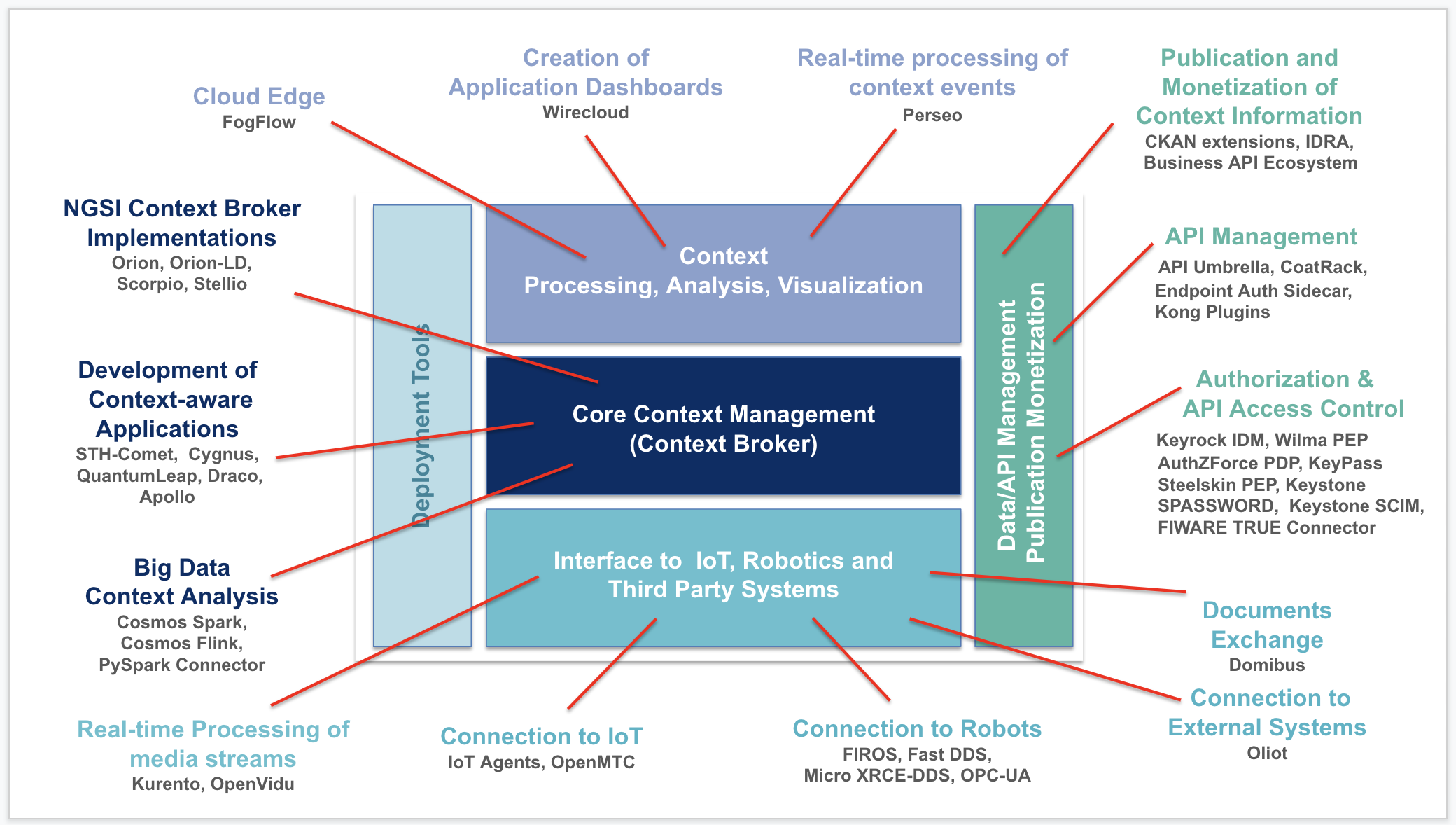
Pile logiciel
docker-compose.yml
# This is the Fiware stack for the Proof Of Concept
version: "3.5"
services:
  # Orion is the context broker
  orion:
    image: fiware/orion:2.2.0
    hostname: orion
    container_name: orion
    restart: unless-stopped
    depends_on:
      - mongo-db
    networks:
      - default
    ports:
      - "1026:1026"
    entrypoint:
      - /usr/bin/contextBroker
      - -fg
      - -multiservice
      - -ngsiv1Autocast
      - -corsOrigin
      - __ALL
    command: -dbhost mongo-db -logLevel ERROR -noCache
    healthcheck:
      test: curl --fail -s http://orion:1026/version || exit 1

  # Cygnus is configured to write context data to Mongo-DB
  cygnus:
    image: fiware/cygnus-ngsi:1.13.0
    hostname: cygnus
    container_name: cygnus
    restart: unless-stopped
    depends_on:
      - mongo-db
    volumes:
      - ./conf/agent_mongo.conf:/opt/apache-flume/conf/agent.conf:ro
    networks:
      - default
    expose:
      - "5050"
      - "5080"
    ports:
      - "5050:5050"
      - "5080:5080"
    environment:
      - "CYGNUS_MONGO_HOSTS=mongo-db:27017"
      - "CYGNUS_LOG_LEVEL=ERROR"
      - "CYGNUS_SERVICE_PORT=5050"
      - "CYGNUS_API_PORT=5080"
    healthcheck:
      test: curl --fail -s http://localhost:5080/v1/version || exit 1

  # STH-Comet is persisting Short Term History to Mongo-DB
  sth-comet:
    image: fiware/sth-comet:2.5.0
    hostname: sth-comet
    container_name: sth-comet
    restart: unless-stopped
    depends_on:
      - mongo-db
    networks:
      - default
    ports:
      - "8666:8666"
    environment:
      - STH_HOST=0.0.0.0
      - STH_PORT=8666
      - DB_PREFIX=sth_
      - DB_URI=mongo-db:27017
      - LOGOPS_LEVEL=ERROR
    healthcheck:
      test: curl --fail -s http://localhost:8666/version || exit 1

  # IoT Agent is a gateway between context broker and IoT
  iot-agent:
    image: fiware/iotagent-json:1.12.0
    hostname: iot-agent
    container_name: iot-agent
    restart: unless-stopped
    depends_on:
      - mongo-db
    networks:
      - default
    expose:
      - "4041"
      - "7896"
    ports:
      - "4041:4041"
      - "7896:7896"
    environment:
      - IOTA_CB_HOST=orion
      - IOTA_CB_PORT=1026
      - IOTA_NORTH_PORT=4041
      - IOTA_REGISTRY_TYPE=mongodb
      - IOTA_LOG_LEVEL=ERROR
      - IOTA_TIMESTAMP=true
      - IOTA_CB_NGSI_VERSION=v2
      - IOTA_AUTOCAST=true
      - IOTA_MONGO_HOST=mongo-db
      - IOTA_MONGO_PORT=27017
      - IOTA_MONGO_DB=iotagentul
      - IOTA_HTTP_PORT=7896
      - IOTA_PROVIDER_URL=http://iot-agent:4041
      - IOTA_MQTT_HOST=exampe.mqtt.broker.com
      - IOTA_MQTT_PORT=1883
      - IOTA_MQTT_USERNAME=username
      - IOTA_MQTT_PASSWORD=password

 # Databases
  mongo-db:
    image: mongo:3.6
    hostname: mongo-db
    container_name: db-mongo
    restart: unless-stopped
    expose:
      - "27017"
    ports:
      - "27017:27017"
    networks:
      - default
    command: --bind_ip_all --smallfiles
    volumes:
      - mongo-db:/data/db

  # Client Database
  mongoclient:
    image: mongoclient/mongoclient:latest
    container_name: mongoclient
    hostname: mongoclient
    restart: unless-stopped
    depends_on:
      - mongo-db
    ports:
      - "3300:3000"
    networks:
      - default

networks:
  default:
    ipam:
      config:
        - subnet: 172.19.1.0/24

volumes:
  mongo-db: ~
Configruation de Cygnus
agent_mongo.conf
cygnus-ngsi.sources = http-source
cygnus-ngsi.sinks = mongo-sink
cygnus-ngsi.channels = mongo-channel

cygnus-ngsi.sources.http-source.type = org.apache.flume.source.http.HTTPSource
cygnus-ngsi.sources.http-source.channels = mongo-channel
cygnus-ngsi.sources.http-source.port = 5050
cygnus-ngsi.sources.http-source.handler = com.telefonica.iot.cygnus.handlers.NGSIRestHandler
cygnus-ngsi.sources.http-source.handler.notification_target = /notify
cygnus-ngsi.sources.http-source.handler.default_service = default
cygnus-ngsi.sources.http-source.handler.default_service_path = /
cygnus-ngsi.sources.http-source.interceptors = ts gi
cygnus-ngsi.sources.http-source.interceptors.ts.type = timestamp
cygnus-ngsi.sources.http-source.interceptors.gi.type = com.telefonica.iot.cygnus.interceptors.NGSIGroupingInterceptor$Builder
cygnus-ngsi.sources.http-source.interceptors.gi.grouping_rules_conf_file = /opt/apache-flume/conf/grouping_rules.conf
cygnus-ngsi.sources.http-source.interceptors.nmi.type = com.telefonica.iot.cygnus.interceptors.NGSINameMappingsInterceptor$Builder
cygnus-ngsi.sources.http-source.interceptors.nmi.name_mappings_conf_file = /opt/apache-flume/conf/name_mappings.conf

cygnus-ngsi.sinks.mongo-sink.type = com.telefonica.iot.cygnus.sinks.NGSIMongoSink
cygnus-ngsi.sinks.mongo-sink.channel = mongo-channel
cygnus-ngsi.sinks.mongo-sink.enable_encoding = false
cygnus-ngsi.sinks.mongo-sink.enable_grouping = false
cygnus-ngsi.sinks.mongo-sink.enable_name_mappings = false
cygnus-ngsi.sinks.mongo-sink.enable_lowercase = false
cygnus-ngsi.sinks.mongo-sink.data_model = dm-by-entity
cygnus-ngsi.sinks.mongo-sink.attr_persistence = row
cygnus-ngsi.sinks.mongo-sink.mongo_hosts = mongo-db:27017
#cygnus-ngsi.sinks.mongo-sink.mongo_username = username
#cygnus-ngsi.sinks.mongo-sink.mongo_password = password
cygnus-ngsi.sinks.mongo-sink.db_prefix = sth_
#cygnus-ngsi.sinks.mongo-sink.collection_prefix = sth_
cygnus-ngsi.sinks.mongo-sink.batch_size = 1
cygnus-ngsi.sinks.mongo-sink.batch_timeout = 30
cygnus-ngsi.sinks.mongo-sink.batch_ttl = 10
cygnus-ngsi.sinks.mongo-sink.data_expiration = 0
cygnus-ngsi.sinks.mongo-sink.collections_size = 0
cygnus-ngsi.sinks.mongo-sink.max_documents = 0
cygnus-ngsi.sinks.mongo-sink.ignore_white_spaces = true

cygnus-ngsi.channels.mongo-channel.type = com.telefonica.iot.cygnus.channels.CygnusMemoryChannel
cygnus-ngsi.channels.mongo-channel.capacity = 100000
cygnus-ngsi.channels.mongo-channel.transactionCapacity = 10000
Configuration de l’agent IoT
config.js
var config = {};

/**
 * Configuration for the MQTT binding.
 */
config.mqtt = {
    /**
     * Host where the MQTT Broker is located.
     */
    host: 'mosquitto',
    /**
     * Port where the MQTT Broker is listening.
     */
    port: 1883,
    /**
     * Mosquitto credentials to the IoT Agent configuration, to give it full access to the MQTT Broker topics
     * usernmae: "username",
     * password: "password",
     */
    /**
     * Activating thinkingThingsPlugin flag. When it is set to true the constraint devices sends an HTTP POST request
     * to the server with a Content-Type, containing a field name and a payload. The payload can be divided in modules,
     * each one of them responsible for a single measure. Modules are separated by the '#' character, and all of them
     * consists of a series of parameters separated by commas.
     */
    thinkingThingsPlugin: true,
    /**
     * QoS Level: at most once (0), at least once (1), exactly once (2). (default is 2).
     */
    qos: 0,
    /**
     * Retain flag. (default is true.) Normally if a publisher publishes a message to a topic, and no one is
     * subscribed to that topic (i.e retain flag is set to false) the message is simply discarded by the broker.
     * The publisher can tell the broker to keep the last message on that topic by setting the retained message
     * flag to true.
     */
    retain: false,
    /**
     * Number of MQTT connection error retries (default is 5).
     */
    retries: 5,
    /**
     * Time between MQTT connection retries (default is 5 seconds).
     */
    retryTime: 5,
    /**
     * Time to keep connection open between client and MQTT broker (default is 0 seconds)
     */
    keepalive: 0
};

/**
 * Configuration for the AMQP binding.
 */
//config.amqp = {
    /**
     * Host where the AMQP broker is located.
     */
 //   host: 'localhost',
    /**
     * Port where the AMQP broker is listening.
     */
 //   port: 5672,
    /**
     * user name that identifies the IOTA against the AMQP broker (optional).
     */
    // username: 'guest',
    /**
     * password to be used if the username is provided (optional).
     */
    // password: 'guest',
    /**
     *  Exchange in the AMQP broker
     */
 //   exchange: 'iota-exchange',
    /**
     * Queue in the AMQP broker
     */
//    queue: 'iotaqueue',
    /**
     * durable queue flag (default is false).
     */
//    options: { durable: true }
//};

/**
 * Configuration for the HTTP transport binding.
 */
config.http = {
    /**
     * South Port where the Ultralight transport binding for HTTP will be listening for device requests.
     */
    port: 7896
    /**
     * HTTP Timeout for the http command endpoint (in miliseconds).
     */
    //timeout: 1000
};

config.iota = {
    /**
     * Configures the log level. Appropriate values are: FATAL, ERROR, INFO, WARN and DEBUG.
     */
    logLevel: 'ERROR',
    /**
     * When this flag is active, the IoTAgent will add the TimeInstant attribute to every entity created, as well
     * as a TimeInstant metadata to each attribute, with the current timestamp.
     */
    timestamp: true,
    /**
     * Context Broker configuration. Defines the connection information to the instance of the Context Broker where
     * the IoT Agent will send the device data.
     */
    contextBroker: {
        /**
         * Host where the Context Broker is located.
         */
        host: 'orion',
        /**
         * Port where the Context Broker is listening.
         */
        port: '1026'
    },
    /**
     * Configuration of the North Port of the IoT Agent.
     */
    server: {
        /**
         * Port where the IoT Agent will be listening for NGSI and Provisioning requests.
         */
        port: 4041
    },

    /**
     * Configuration for secured access to instances of the Context Broker secured with a PEP Proxy.
     * For the authentication mechanism to work, the authentication attribute in the configuration has to be fully
     * configured, and the authentication.enabled subattribute should have the value `true`.
     *
     * The Username and password should be considered as sensitive data and should not be stored in plaintext.
     * Either encrypt the config and decrypt when initializing the instance or use environment variables secured by
     * docker secrets.
     */
    //authentication: {
    //enabled: false,
    /**
     * Type of the Identity Manager which is used when authenticating the IoT Agent.
     */
    //type: 'keystone',
    /**
     * Name of the additional header passed to hold the identity of the IoT Agent
     */
    //header: 'X-Auth-Token',
    /**
     * Hostname of the Identity Manager.
     */
    //host: 'localhost',
    /**
     * Port of the Identity Manager.
     */
    //port: '5000',
    /**
     * Username for the IoT Agent - Note this should not be stored in plaintext.
     */
    //user: 'IOTA_AUTH_USER',
    /**
     * Password for the IoT Agent - Note this should not be stored in plaintext.
     */
    //password: 'IOTA_AUTH_PASSWORD',
    /**
     * OAuth2 client ID - Note this should not be stored in plaintext.
     */
    //clientId: 'IOTA_AUTH_CLIENT_ID',
    /**
     * OAuth2 client secret - Note this should not be stored in plaintext.
     */
    //clientSecret: 'IOTA_AUTH_CLIENT_SECRET'
    //},

    /**
     * Defines the configuration for the Device Registry, where all the information about devices and configuration
     * groups will be stored. There are currently just two types of registries allowed:
     *
     * - 'memory': transient memory-based repository for testing purposes. All the information in the repository is
     *             wiped out when the process is restarted.
     *
     * - 'mongodb': persistent MongoDB storage repository. All the details for the MongoDB configuration will be read
     *             from the 'mongodb' configuration property.
     */
    deviceRegistry: {
        type: 'mongodb'
    },
    /**
     * Mongo DB configuration section. This section will only be used if the deviceRegistry property has the type
     * 'mongodb'.
     */
    mongodb: {
        /**
         * Host where MongoDB is located. If the MongoDB used is a replicaSet, this property will contain a
         * comma-separated list of the instance names or IPs.
         */
        host: 'mongo-db',
        /**
         * Port where MongoDB is listening. In the case of a replicaSet, all the instances are supposed to be listening
         * in the same port.
         */
        port: '27017',
        /**
         * Name of the Mongo database that will be created to store IoT Agent data.
         */
        db: 'iotagentjson'
    },
    /**
     * Types array for static configuration of services. Check documentation in the IoT Agent Library for Node.js for
     *  further details:
     *
     *      https://github.com/telefonicaid/iotagent-json#type-configuration
     */
    types: {},
    /**
     * Default service, for IoT Agent installations that won't require preregistration.
     */
    service: 'service',
    /**
     * Default subservice, for IoT Agent installations that won't require preregistration.
     */
    subservice: '/subservice',
    /**
     * URL Where the IoT Agent Will listen for incoming updateContext and queryContext requests (for commands and
     * passive attributes). This URL will be sent in the Context Registration requests.
     */
    providerUrl: 'http://localhost:4041',
    /**
     * Default maximum expire date for device registrations.
     */
    deviceRegistrationDuration: 'P20Y',
    /**
     * Default type, for IoT Agent installations that won't require preregistration.
     */
    defaultType: 'Thing',
    /**
     * Default resource of the IoT Agent. This value must be different for every IoT Agent connecting to the IoT
     * Manager.
     */
    defaultResource: '/iot/json'
};

/**
 * flag indicating whether the incoming notifications to the IoTAgent should be processed using the bidirectionality
 * plugin from the latest versions of the library or the JSON-specific configuration retrieval mechanism.
 */
config.configRetrieval = false;
/**
 * Default API Key, to use with device that have been provisioned without a Configuration Group.
 */
config.defaultKey = 'default_key';
/**
 * Default transport protocol when no transport is provisioned through the Device Provisioning API.
 */
config.defaultTransport = 'MQTT';
/**
 * flag indicating whether the node server will be executed in multi-core option (true) or it will be a
 * single-thread one (false).
 */
//config.multiCore = false;

module.exports = config;