Devops #1 - Digital Factory
DevOps #1 Créer une toolchain DevOps accélérant mon Time To Market
Initialisation du Workshop
Dépendances du workhsop
Le workshop se compose des outils suivants à installer ou créer un compte :
- Visual Studio Code
- Sonar Lint
- Hugo CLI
- Slack
- Azure DevOps
- [Zoom] (https://zoom.us/signin)
- GitHub
- CircleCI
- SonarCloud
- LambdaTest
- K6 Cloud
- Pivotal Web Services
Afin de faciliter la mise en place du tech-lunch il est suggéré de commencer par la création d’un compte GitHub, cela permet par la suite d’interconnectée son compte Github aux différents services.
Création des canaux de communication dans Slack
La segmentation des canaux de communication doit permettre à l’entreprise, pôle, équipe d’organiser les sujets. Afin de respecter les bonnes pratiques de création de canal, suivre les instructions suivantes : Slack Best Pratiques
Dans le cadre de notre workshop, voici les canaux à créer :
- Aide-moi-devops (Ce canal doit permettre de faire des demandes d’aides sur les problématiques DevOps)
- Annonces-globale (Ce canal doit permettre une communication globale des informations)
- Annonces-ingénieur (Ce canal doit permettre des échanges entres les ingénieurs de plusieurs équipes)
- Devops (Ce canal doit permettre des échanges sur les sujets DevOps, concernant les pratiques, les outils, etc…)
- Montpellier (Ce canal doit permettre des échanges concernant la localisation pouvant impacter les collaborateurs)
- Proj-tech-lunch-devops (Ce canal doit permettre des échanges concernant le projet Tech-Lunch-DevOps)
- Suivis-projet (Ce canal produit des notifications concernant les processus CI/CD, des suivis de version du code source, de l’état de la plateforme, etc…)
- Team-devops (Ce canal est dédié à l’équipe DevOps pour l’échange d’informations)
Création du suivis des tâches Agile dans Azure DevOps
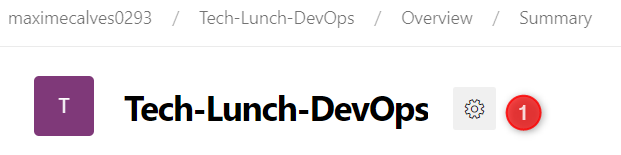
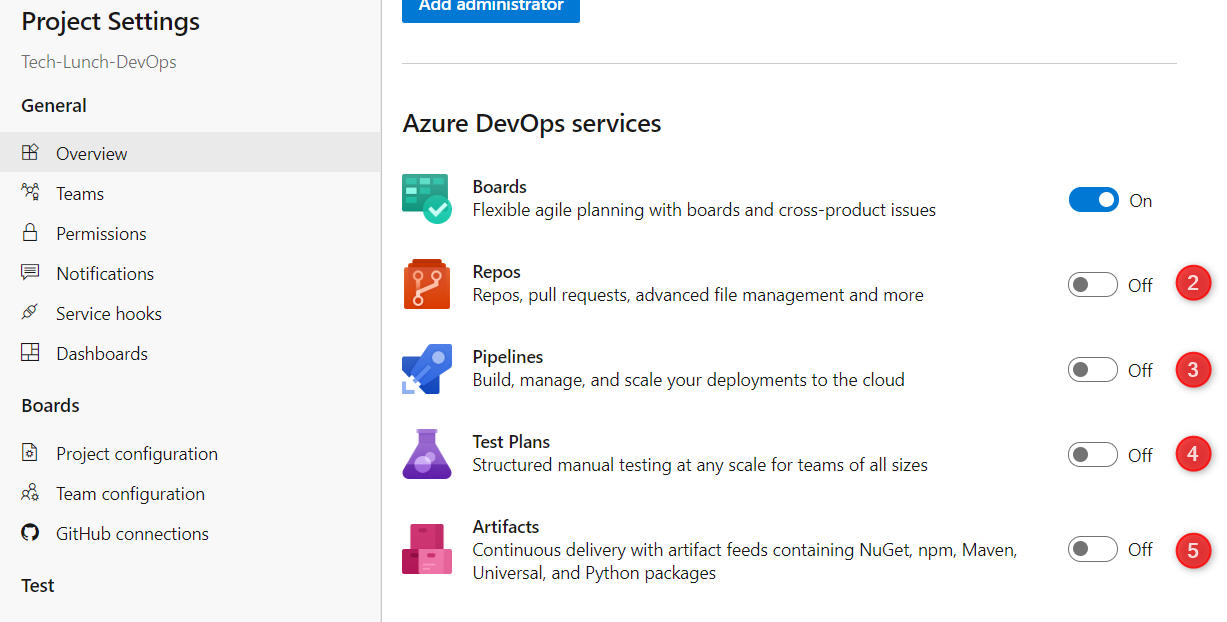
Après avoir créer votre espace projet, il faut le configurer pour utiliser uniquement les services utiles :
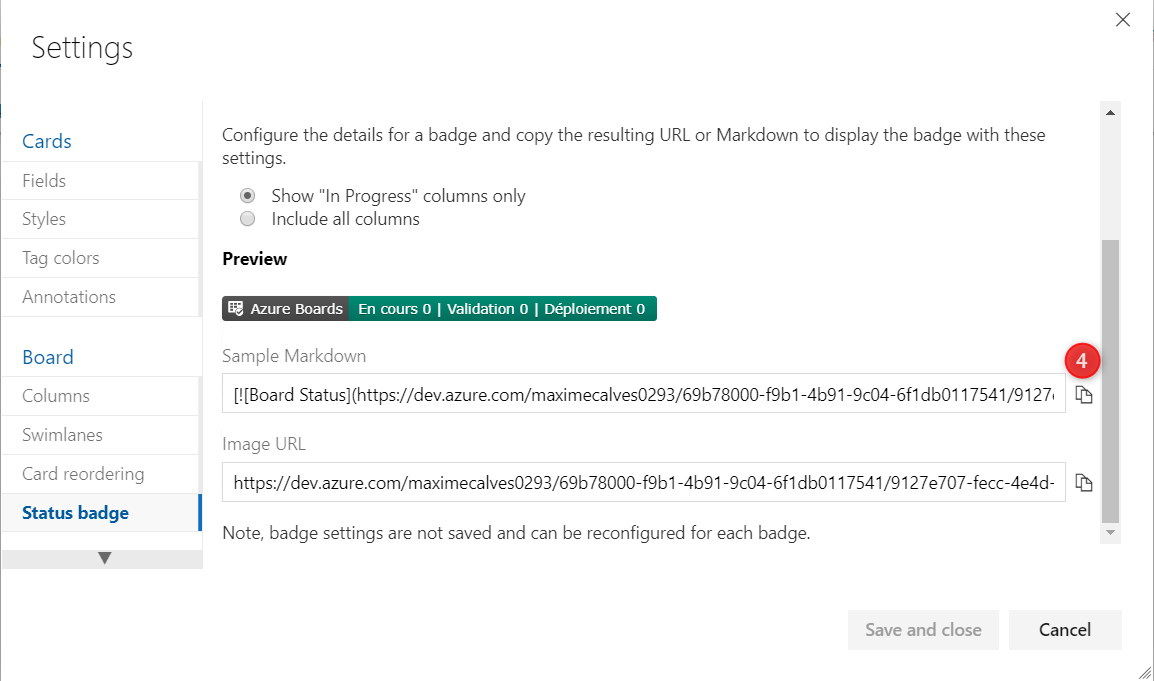
Copier le lien du badge Markdown et stocker le pour la suite du workshop :
Alimenter le Kanban de la manière suivante :
- TL 1 - Développer le site web Tech Lunch
- TL 2 - Créer une tâche AzureBoard avec Slack
- TL 3 - Créer une vision conférence sur Slack
- TL 4 - Implémenter un processus de CI/CD
- TL 5 - Créer une “Issue” Github dans Slack
- TL 6 - Créer le processus de qualité du code
- TL 7 - Configurer un Bot pour Slack
- TL 8 - Créer le processus de test utilisateur
- TL 9 - Créer le processus de monté de charge
- TL 10 - Créer un processus nocture
Développement du site Tech-Lunch
AzureBoard pour Slack
/azboards signin
/azboards link https://dev.azure.com/maximecalves0293/Tech-Lunch-DevOps
Github pour Slack
Ajouter l’app de github dans Slack :
Hugo Developpement (TL 1)
hugo new site tech-lunch-devops
cd tech-lunch-devops/
git init
git remote add origin https://github.com/Maxime-CLS/tech-lunch-devops.git
git submodule add https://github.com/budparr/gohugo-theme-ananke.git themes/ananke
config.toml
baseURL = "https://tech-lunch-devops.cfapps.io/"
languageName = "Français"
languageCode = "fr-FR"
title = "Tech-Lunch-DevOps"
theme = "ananke"
DefaultContentLanguage = "fr"
### Pour le theme presentation
[params]
favicon = ""
facebook = "https://www.facebook.com/"
twitter = "https://twitter.com/GoHugoIO"
instagram = "https://www.instagram.com/?hl=fr"
youtube = "https://www.youtube.com/?hl=FR"
linkedin = "https://fr.linkedin.com/"
background_color_class = "bg-black"
[outputs]
home = ["HTML", "RSS", "JSON"]
hugo server -D
git add -A
git commit -m "Initialisation du projet"
git push -u origin master
AzureBoard pour Github
Ajouter dans US TL 1 l’historique du commit via son URL.
Collaboration continue
Créer une tâche avec Slack (TL 2)
/azboards link https://dev.azure.com/maximecalves0293/Tech-Lunch-DevOps
/azboards create

Backlog

TL - Je suis une tâche créer via Slack 😊
Créer une visionconférence avec Zoom sur Slack (TL 3)
/zoom meeting tech-lunch-devops
Créer une tâche dans github sur Slack (TL 5)
Créer la souscription du canal aide-moi du projet github.
/github subscribe Maxime-CLS/tech-lunch-devops
/github open Maxime-CLS/tech-lunch-devops
Développement des processus automatisés (TL 4)
Créer le fichier manifest.yml et ajouter le contenu suivant :
manifest.yml
---
applications:
  -
    name: tech-lunch-devops
    memory: 64M
    path: public
    buildpacks:
      - staticfile_buildpack
    routes:
      - route: tech-lunch-devops.cfapps.io
    env:
      FORCE_HTTPS: true
:warning: Penser à changer la valeur routes par la route de votre site web.
Créer l’arborscence .circleci, créer le fichier config.yml et ajouter le contenu suivant :
version: 2.1

orbs:
  slack: circleci/slack@3.4.2

jobs:
  build:
    docker:
      # 2019-10-23 BTH: had to fix the version as there is a breaking change in latest (=0.59)
      # See https://hub.docker.com/r/cibuilds/hugo, https://github.com/cibuilds/hugo
      - image: cibuilds/hugo:0.58.3
    steps:
      - checkout
      - run:
          name: Install git client
          command: apk update && apk add git
      - run:
          name: Load submodule
          command: git submodule sync && git submodule update --init
      - run:
          name: Build Hugo static website
          command: HUGO_ENV=production hugo
      - run:
          name: Test generated HTML files
          command: |
            htmlproofer public/ --allow-hash-href --check-html \
            --empty-alt-ignore --disable-external
      - run:
          name: Install CF CLI
          command: |
            apk add wget
            wget https://cli.run.pivotal.io/stable?release=linux64-binary
            mv stable?release=linux64-binary /tmp/cf-cli.tgz
            mkdir -p /usr/local/bin
            tar -xzf /tmp/cf-cli.tgz -C /usr/local/bin
            cf --version
            rm -f /tmp/cf-cli.tgz
      - run:
          name: Deploy
          command: |
            cf login -a "$CF_API" -u "$CF_USERNAME" -p "$CF_PASSWORD" -o "$CF_ORG" -s "$CF_SPACE_PROD"
            cf push
      - run: exit 0
      - slack/status:
          fail_only: false
          only_for_branches: 'master'
          webhook: '${SLACK_WEBHOOK}'

workflows:
  version: 2.1
  build_deploy_tests_and_scan:
    jobs:
      - build
Créer un fichier nommée .gitignore et ajouter le contenu suivant :
public/
browser-testing/node_modules
Créer l’arboresence suivante pour le contenu CSS : assets/css/test.scss et ajouter le contenu suivant :
Ficher CSS
Ce connecter à l’interface Web CircleCI et ajouter les variables d’environnements :
- CF_API : https://api.run.pivotal.io
- CF_USERNAME : adresse_mail
- CF_PASSWORD : password
- CF_ORG : tech-lunch-devops
- CF_SPACE_PROD : development
Pousser le code dans Github :
git add -A
git commit -m "Initialisation du processus de CI/CD, Fixé AB#4"
git push
Développement du scan de qualité/sécurité du code source (TL 6)
Créer le fichier suivant : sonar-project.properties et ajouter le contenu suivant :
sonar.projectKey=Maxime-CLS_tech-lunch-devops
sonar.organization=Maxime-CLS

# This is the name and version displayed in the SonarCloud UI.
sonar.projectName=tech-lunch-devops
sonar.projectVersion=1.0

# Path is relative to the sonar-project.properties file. Replace "\" by "/" on Windows.
sonar.sources=.

# Encoding of the source code. Default is default system encoding
sonar.sourceEncoding=UTF-8
:warning: Penser à changer les valeurs de projectKey, organization
Modifier le fichier config.yml et remplacer le contenu par le suivant :
version: 2.1

orbs:
  slack: circleci/slack@3.4.2

jobs:
  build:
    docker:
      # 2019-10-23 BTH: had to fix the version as there is a breaking change in latest (=0.59)
      # See https://hub.docker.com/r/cibuilds/hugo, https://github.com/cibuilds/hugo
      - image: cibuilds/hugo:0.58.3
    steps:
      - checkout
      - run:
          name: Install git client
          command: apk update && apk add git
      - run:
          name: Load submodule
          command: git submodule sync && git submodule update --init
      - run:
          name: Build Hugo static website
          command: HUGO_ENV=production hugo
      - run:
          name: Test generated HTML files
          command: |
            htmlproofer public/ --allow-hash-href --check-html \
            --empty-alt-ignore --disable-external
      - run:
          name: Install CF CLI
          command: |
            apk add wget
            wget https://cli.run.pivotal.io/stable?release=linux64-binary
            mv stable?release=linux64-binary /tmp/cf-cli.tgz
            mkdir -p /usr/local/bin
            tar -xzf /tmp/cf-cli.tgz -C /usr/local/bin
            cf --version
            rm -f /tmp/cf-cli.tgz
      - run:
          name: Deploy
          command: |
            cf login -a "$CF_API" -u "$CF_USERNAME" -p "$CF_PASSWORD" -o "$CF_ORG" -s "$CF_SPACE_PROD"
            cf push
      - run: exit 0
      - slack/status:
          fail_only: false
          only_for_branches: 'master'
          webhook: '${SLACK_WEBHOOK}'

  scan:
     docker:
       - image: sonarsource/sonarcloud-scan:1.0.1
     steps:
     - checkout
     - run:
         name: Quality Scan
         command: sonar-scanner -Dsonar.host.url=https://sonarcloud.io -Dsonar.login="$SONAR_LOGIN"
     - run: exit 0
     - slack/status:
         fail_only: false
         only_for_branches: 'master'
         webhook: '${SLACK_WEBHOOK}'

workflows:
  version: 2.1
  build_deploy_tests_and_scan:
    jobs:
      - scan
      - build:
          requires:
            - scan
Se connecter à SonarCloud est générer un token d’authentification : SonarCloud Docs
Ce connecter à l’interface Web CircleCI et ajouter les variables d’environnements :
- SONAR_LOGIN : password
Pousser le code dans Github :
git add -A
git commit -m "Initialisation du processus de qualité de code, Fixé AB#6"
git push
Ajouter la fonctionnalité de UptimeBot (TL 7)
Utiliser UptimeBot de Slack et le configurer sur l’URL du techlunch.
Développer un processus de test utilisateur (TL 8)
Créer une arborescence dans le projet Github : browser-testing/tech-lunch.js
Ajouter le contenu suivant dans le fichier tech-lunch.js :
const webdriver = require('selenium-webdriver');
    By = webdriver.By,
    until = webdriver.until;

// username: Username can be found at automation dashboard
const USERNAME = process.env.LAMBDA_USER;

// AccessKey:  AccessKey can be generated from automation dashboard or profile section
const KEY = process.env.LAMBDA_KEY;

// gridUrl: gridUrl can be found at automation dashboard
const GRID_HOST = 'hub.lambdatest.com/wd/hub';

function searchTextOnGoogle() {
// Setup Input capabilities
    const capabilities = {
       platform: 'windows 10',
       browserName: 'chrome',
       version: '67.0',
       resolution: '1280x800',
       network: true,
       visual: true,
       console: true,
       name: 'Test 1', // name of the test
       build: 'NodeJS build', // name of the build
       video: true,
       timezone: "UTC+01:00",
       geoLocation: "FR"
     };


// URL: https://{username}:{accessToken}@hub.lambdatest.com/wd/hub

const gridUrl = 'https://' + USERNAME + ':' + KEY + '@' + GRID_HOST;

// setup and build selenium driver object
     const driver = new webdriver.Builder()
     .usingServer(gridUrl)
     .withCapabilities(capabilities)
     .build();

    // navigate to a url, search for a text and get title of page
    driver.get('https://tech-lunch-devops.cfapps.io/').then(function() {
        return driver.getCurrentUrl();
    })
    .then(function(CurrentUrl){
        console.log(CurrentUrl)
        setTimeout(() => {  console.log("End sleep"); }, 10000);
        driver.quit();
    })
}
searchTextOnGoogle();
Le contenu du fichier tech-lunch.js est une adaptation de l’exemple : Exemple NodeJS
Modifier le fichier config.yml et remplacer le contenu par le suivant :
version: 2.1

orbs:
  slack: circleci/slack@3.4.2

jobs:
  build:
    docker:
      # 2019-10-23 BTH: had to fix the version as there is a breaking change in latest (=0.59)
      # See https://hub.docker.com/r/cibuilds/hugo, https://github.com/cibuilds/hugo
      - image: cibuilds/hugo:0.58.3
    steps:
      - checkout
      - run:
          name: Install git client
          command: apk update && apk add git
      - run:
          name: Load submodule
          command: git submodule sync && git submodule update --init
      - run:
          name: Build Hugo static website
          command: HUGO_ENV=production hugo
      - run:
          name: Test generated HTML files
          command: |
            htmlproofer public/ --allow-hash-href --check-html \
            --empty-alt-ignore --disable-external
      - run:
          name: Install CF CLI
          command: |
            apk add wget
            wget https://cli.run.pivotal.io/stable?release=linux64-binary
            mv stable?release=linux64-binary /tmp/cf-cli.tgz
            mkdir -p /usr/local/bin
            tar -xzf /tmp/cf-cli.tgz -C /usr/local/bin
            cf --version
            rm -f /tmp/cf-cli.tgz
      - run:
          name: Deploy
          command: |
            cf login -a "$CF_API" -u "$CF_USERNAME" -p "$CF_PASSWORD" -o "$CF_ORG" -s "$CF_SPACE_PROD"
            cf push
      - run: exit 0
      - slack/status:
          fail_only: false
          only_for_branches: 'master'
          webhook: '${SLACK_WEBHOOK}'

  scan:
     docker:
       - image: sonarsource/sonarcloud-scan:1.0.1
     steps:
     - checkout
     - run:
         name: Quality Scan
         command: sonar-scanner -Dsonar.host.url=https://sonarcloud.io -Dsonar.login="$SONAR_LOGIN"
     - run: exit 0
     - slack/status:
         fail_only: false
         only_for_branches: 'master'
         webhook: '${SLACK_WEBHOOK}'

  testUI:
      docker:
        - image: circleci/node:13.10.1-browsers
      steps:
        - checkout
        - run:
            name: Browser Testing
            command: |
              npm i selenium-webdriver
              node browser-testing/tech-lunch.js
        - run: exit 0
        - slack/status:
            fail_only: false
            only_for_branches: 'master'
            webhook: '${SLACK_WEBHOOK}'

workflows:
  version: 2.1
  build_deploy_tests_and_scan:
    jobs:
      - scan
      - build:
          requires:
            - build
      - testUI:
          requires:
            - build
Ce connecter à l’interface Web CircleCI et ajouter les variables d’environnements :
- LAMBDA_USER : maxime.calves
- LAMBDA_KEY : Profile->Access-Token
Pousser le code dans Github :
git add -A
git commit -m "Initialisation du processus de test utilisateur, Fixé AB#8"
git push
Développer un processus de montée en charge (TL 9)
Créer une arborescence dans le projet Github : loadtests/performance-test.js
Ajouter le contenu suivant dans le fichier performance-test.js :
import { group, sleep } from 'k6';
import http from 'k6/http';

// Version: 1.2
// Creator: k6 Browser Recorder

export let options = {
    duration: "1m",
  vus: 10,
  thresholds: {
    http_req_duration: ["p(95)<500"]
  }
};

export default function() {

	group("page_0 - https://tech-lunch-devops.cfapps.io/", function() {
		let req, res;
		req = [{
			"method": "get",
			"url": "https://tech-lunch-devops.cfapps.io/",
			"params": {
				"headers": {
					"Upgrade-Insecure-Requests": "1",
					"User-Agent": "Mozilla/5.0 (Windows NT 10.0; Win64; x64) AppleWebKit/537.36 (KHTML, like Gecko) Chrome/80.0.3987.149 Safari/537.36",
					"Sec-Fetch-Dest": "document",
					"Accept": "text/html,application/xhtml+xml,application/xml;q=0.9,image/webp,image/apng,*/*;q=0.8,application/signed-exchange;v=b3;q=0.9"
				}
			}
		},{
			"method": "get",
			"url": "https://tech-lunch-devops.cfapps.io/dist/css/app.1cb140d8ba31d5b2f1114537dd04802a.css",
			"params": {
				"headers": {
					"User-Agent": "Mozilla/5.0 (Windows NT 10.0; Win64; x64) AppleWebKit/537.36 (KHTML, like Gecko) Chrome/80.0.3987.149 Safari/537.36",
					"Sec-Fetch-Dest": "style",
					"Accept": "text/css,*/*;q=0.1"
				}
			}
		},{
			"method": "get",
			"url": "https://tech-lunch-devops.cfapps.io/dist/js/app.3fc0f988d21662902933.js",
			"params": {
				"headers": {
					"User-Agent": "Mozilla/5.0 (Windows NT 10.0; Win64; x64) AppleWebKit/537.36 (KHTML, like Gecko) Chrome/80.0.3987.149 Safari/537.36",
					"Sec-Fetch-Dest": "script",
					"Accept": "*/*"
				}
			}
		}];
		res = http.batch(req);
		// Random sleep between 20s and 40s
		sleep(Math.floor(Math.random()*20+20));
	});

}
K6 Cloud propose un enregustreur via un plugin Chrome : Plugin K6 Record
Voici un tutorial pour réaliser l’enregistrement : Tuto Record
Modifier le fichier config.yml et remplacer le contenu par le suivant :
version: 2.1

orbs:
  slack: circleci/slack@3.4.2

jobs:
  build:
    docker:
      # 2019-10-23 BTH: had to fix the version as there is a breaking change in latest (=0.59)
      # See https://hub.docker.com/r/cibuilds/hugo, https://github.com/cibuilds/hugo
      - image: cibuilds/hugo:0.58.3
    steps:
      - checkout
      - run:
          name: Install git client
          command: apk update && apk add git
      - run:
          name: Load submodule
          command: git submodule sync && git submodule update --init
      - run:
          name: Build Hugo static website
          command: HUGO_ENV=production hugo
      - run:
          name: Test generated HTML files
          command: |
            htmlproofer public/ --allow-hash-href --check-html \
            --empty-alt-ignore --disable-external
      - run:
          name: Install CF CLI
          command: |
            apk add wget
            wget https://cli.run.pivotal.io/stable?release=linux64-binary
            mv stable?release=linux64-binary /tmp/cf-cli.tgz
            mkdir -p /usr/local/bin
            tar -xzf /tmp/cf-cli.tgz -C /usr/local/bin
            cf --version
            rm -f /tmp/cf-cli.tgz
      - run:
          name: Deploy
          command: |
            cf login -a "$CF_API" -u "$CF_USERNAME" -p "$CF_PASSWORD" -o "$CF_ORG" -s "$CF_SPACE_PROD"
            cf push
      - slack/status:
          fail_only: false
          only_for_branches: 'master'
          webhook: '${SLACK_WEBHOOK}'

  scan:
     docker:
       - image: sonarsource/sonarcloud-scan:1.0.1
     steps:
     - checkout
     - run:
         name: Quality Scan
         command: sonar-scanner -Dsonar.host.url=https://sonarcloud.io -Dsonar.login="$SONAR_LOGIN"
     - run: exit 0
     - slack/status:
         fail_only: false
         only_for_branches: 'master'
         webhook: '${SLACK_WEBHOOK}'
     - run: exit 0
     - slack/status:
         fail_only: false
         only_for_branches: 'master'
         webhook: '${SLACK_WEBHOOK}'

  testUI:
      docker:
        - image: circleci/node:13.10.1-browsers
      steps:
        - checkout
        - run:
            name: Browser Testing
            command: |
              npm i selenium-webdriver
              node browser-testing/tech-lunch.js
        - run: exit 0
        - slack/status:
            fail_only: false
            only_for_branches: 'master'
            webhook: '${SLACK_WEBHOOK}'

  test:
     machine: true
     steps:
     - checkout
     - run:
        name: Running k6 tests
        command: |
          docker pull loadimpact/k6:latest
          docker run -i -e K6_CLOUD_TOKEN=$K6_CLOUD_TOKEN -v $PWD:/ci/ loadimpact/k6:latest cloud /ci/loadtests/performance-test.js
     - run: exit 0
     - slack/status:
         fail_only: false
         only_for_branches: 'master'
         webhook: '${SLACK_WEBHOOK}'

workflows:
  version: 2.1
  build_deploy_tests_and_scan:
    jobs:
      - scan
      - build:
          requires:
            - build
      - testUI:
          requires:
            - build
      - test:
          requires:
            - build
            - testUI
Ce connecter à l’interface Web CircleCI et ajouter les variables d’environnements :
- K6_CLOUD_TOKEN
Ajouter API pour slack : [API Slack](https://api.slack.com/messaging/webhooks#posting_with_webhooks https://k6.io/docs/cloud/integrations/notifications)
Pousser le code dans Github :
git add -A
git commit -m "Initialisation du processus de test utilisateur, Fixé AB#9"
git push
Développer un processus de CI/CD nocturne (TL 10)
Modifier le fichier config.yml et remplacer le contenu par le suivant :
version: 2.1

orbs:
  slack: circleci/slack@3.4.2

jobs:
  build:
    docker:
      # 2019-10-23 BTH: had to fix the version as there is a breaking change in latest (=0.59)
      # See https://hub.docker.com/r/cibuilds/hugo, https://github.com/cibuilds/hugo
      - image: cibuilds/hugo:0.58.3
    steps:
      - checkout
      - run:
          name: Install git client
          command: apk update && apk add git
      - run:
          name: Load submodule
          command: git submodule sync && git submodule update --init
      - run:
          name: Build Hugo static website
          command: HUGO_ENV=production hugo
      - run:
          name: Test generated HTML files
          command: |
            htmlproofer public/ --allow-hash-href --check-html \
            --empty-alt-ignore --disable-external
      - run:
          name: Install CF CLI
          command: |
            apk add wget
            wget https://cli.run.pivotal.io/stable?release=linux64-binary
            mv stable?release=linux64-binary /tmp/cf-cli.tgz
            mkdir -p /usr/local/bin
            tar -xzf /tmp/cf-cli.tgz -C /usr/local/bin
            cf --version
            rm -f /tmp/cf-cli.tgz
      - run:
          name: Deploy
          command: |
            cf login -a "$CF_API" -u "$CF_USERNAME" -p "$CF_PASSWORD" -o "$CF_ORG" -s "$CF_SPACE_PROD"
            cf push
      - run: exit 0
      - slack/status:
          fail_only: false
          only_for_branches: 'master'
          webhook: '${SLACK_WEBHOOK}'

  scan:
     docker:
       - image: sonarsource/sonarcloud-scan:1.0.1
     steps:
     - checkout
     - run:
         name: Quality Scan
         command: sonar-scanner -Dsonar.host.url=https://sonarcloud.io -Dsonar.login="$SONAR_LOGIN"
     - run: exit 0
     - slack/status:
         fail_only: false
         only_for_branches: 'master'
         webhook: '${SLACK_WEBHOOK}'

  testUI:
      docker:
        - image: circleci/node:13.10.1-browsers
      steps:
        - checkout
        - run:
            name: Browser Testing
            command: |
              npm i selenium-webdriver
              node browser-testing/tech-lunch.js
        - run: exit 0
        - slack/status:
            fail_only: false
            only_for_branches: 'master'
            webhook: '${SLACK_WEBHOOK}'

  test:
     machine: true
     steps:
     - checkout
     - run:
        name: Running k6 tests
        command: |
          docker pull loadimpact/k6:latest
          docker run -i -e K6_CLOUD_TOKEN=$K6_CLOUD_TOKEN -v $PWD:/ci/ loadimpact/k6:latest cloud /ci/loadtests/performance-test.js
     - run: exit 0
     - slack/status:
         fail_only: false
         only_for_branches: 'master'
         webhook: '${SLACK_WEBHOOK}'

workflows:
  version: 2.1
  build_deploy_tests_and_scan:
    jobs:
      - scan
      - build:
          requires:
            - build
      - testUI:
          requires:
            - build
      - test:
          requires:
            - build
            - testUI

 # Scheduled workflows may be delayed by up to 15 minutes.
 # This is done to maintain reliability during busy times such as 12:00am UTC.
 # Scheduled workflows should not assume they are started with to-the-minute accuracy.
  nightly:
    triggers:
      - schedule:
          cron: "0 0 * * *"
          filters:
            branches:
              only:
                - master
    jobs:
      - build
      - scan
Pousser le code dans Github :
git add -A
git commit -m "Initialisation du processus de test utilisateur, Fixé AB#10"
git push